Token Insight Profile (TIP)
Signal strength, not investment quality.
TIP isn't measuring investment quality. It's measuring the strength of the signals we've defined.
Based on measurable token fundamentals and available on-chain data. Not an investment rating.
Token research should begin with clear evidence, not guesswork. TIP (Token Insight Profile) brings important token information together in one compact, inspectable profile inside Synthwav Trade, so you can see what the defined signals and supporting data say about a token.
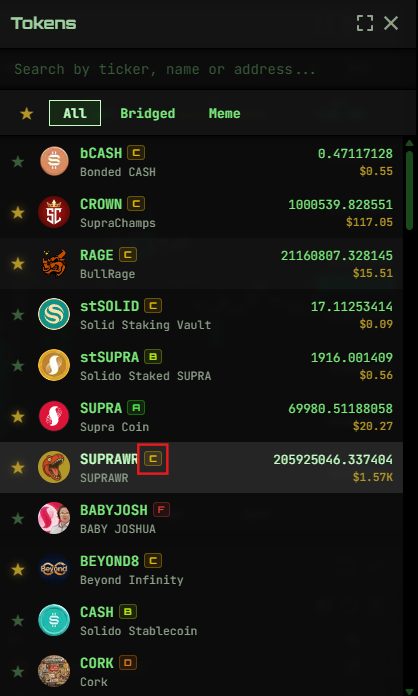
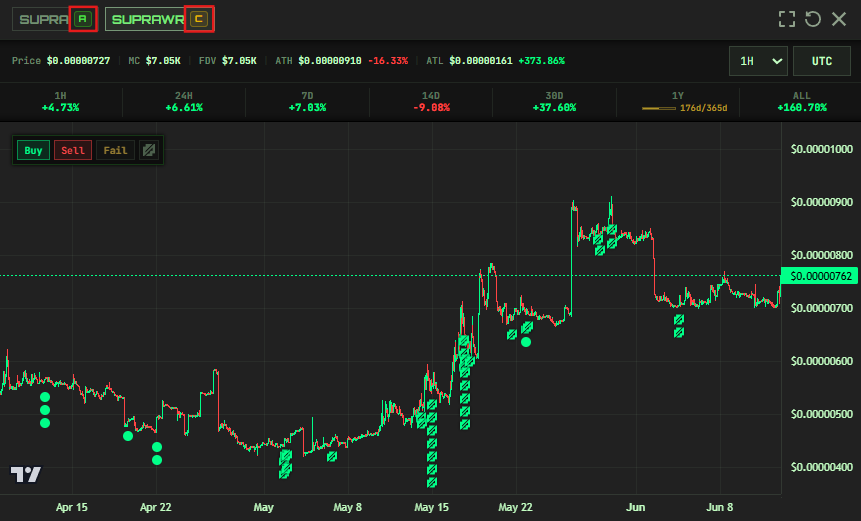
Each supported token receives a score out of 100 and a letter grade from A through F. The grade appears directly beside supported tokens in the advanced token selector and chart controls, keeping context close to the moment it matters, whether you're comparing assets, reviewing a chart, or preparing a trade.
Selecting a grade opens the full profile, where the score is separated into measurable factors. You see the data that contributed to the result instead of an unexplained opinion.
Where to Find TIP
TIP grades appear:
- Beside tokens in the standard and advanced token selectors, compare grades while choosing what to trade.
- In the chart controls, keep a token's profile in view while researching price action.
Select any grade to open the full profile and inspect the factor breakdown.
Share a token's profile with https://synthwav.io/tip/<CA>. Opening it loads that token's existing TIP modal; no wallet connection is needed to view the public profile. The Copy TIP link button in the modal header copies its direct profile link. Creator edit links remain separate at /tip/edit/<CA>.
The Score and Grade
A token's final score out of 100 determines its letter grade:
| Grade | Score |
|---|---|
| A | 80+ |
| B | 60+ |
| C | 40+ |
| D | 20+ |
| F | below 20 |
Confirmed Atmos Studio, WARs Floor, and Hoglet Launcher tokens show STDO, FLOR, or LNCR instead of a letter grade until graduation. Their total score and category scores remain visible. Graduated tokens receive the normal letter grade; tokens launched outside these platforms do not need a GRAD tag to receive a grade. Hoglet graduation requires confirmed migration to a DEX, not just completion of the bonding curve.
How TIP Scores a Token
TIP evaluates seven factors, each with its own maximum contribution to the total score. This is Token Score methodology version 4:
| Factor | Max Points | What It Measures |
|---|---|---|
| MC | 30 | (Market Cap) The token's current market scale |
| TVL | 20 | (Total Value Locked) Trusted-priced USD value in supported DEX pools and DeFi protocol deposits |
| Depth | 10 | Supported TVL relative to Market Cap |
| 7-day activity | 10 | Recent unique trade activity |
| Profile | 15 | Completion of the description, website, and social presence |
| Token age | 10 | How long the asset has been active |
| Ticker originality | 5 | Whether the ticker is the earliest supported launch using that symbol |
Market Cap carries the most weight because established market value is an important measure of a token's current scale. Liquidity is separated into Total Value Locked (TVL) and Depth so TIP can distinguish the amount of liquidity from how strongly that liquidity supports the token's size. Age and activity add market context, originality identifies duplicate tickers, and Profile measures whether users have enough public information to research the project.
Understanding the Factors
MC
Market Cap is calculated from the token's current price and the applicable market supply. Synthwav's registry accounts for token identifiers and paired Coin or Fungible Asset records when resolving supply, so Market Cap reflects the correct underlying asset.
TVL
TVL means Total Value Locked and measures trusted-priced USD value across supported DEX pools and DeFi protocol deposits. Current indexed sources include Atmos, Spikey, LeoEx, Dexlyn, and supported Solido Flow and Cash deposits. Higher TVL indicates more value supporting the token ecosystem, but protocol deposits are not necessarily available for immediate DEX trading.
Depth
Depth is calculated as TVL / Market Cap * 100. It shows how much supported locked value exists relative to the token's market size. Because TVL includes supported protocol deposits as well as DEX pools, Depth is an ecosystem-liquidity indicator—not a direct prediction of trade price impact.
Depth uses these scoring tiers:
- 10 points: 40% or higher
- 8 points: 20% to 39.99%
- 6 points: 10% to 19.99%
- 4 points: 5% to 9.99%
- 2 points: 2% to 4.99%
- 0 points: below 2%, or when the required data is unavailable
7-Day Activity
Activity counts unique token trade transactions recorded through Supra RPC during the previous seven days, a signal of recent participation beyond price movement.
Profile
Profile scoring uses a simple completion ladder:
- 15 points: website, description, and at least one social link
- 10 points: website and at least one social link, without a description
- 5 points: website only, or one or more social links only
- 0 points: no website or social links
A description does not earn points by itself. The profile links directly to the project's website, X, Telegram, and Discord where available so you can inspect them independently.
Token Age
Age reflects how long the asset has been active, giving context that a price chart alone can't.
Ticker Originality
Originality checks whether the displayed ticker is unique among the supported tokens in the current registry-backed list. This is useful because duplicate symbols can create confusion even when the underlying contract addresses are different.
Community Growth Fund (CGF)
Regular paid TIP metadata edit fees go directly to the Community Growth Fund. The CGF reinvests those SUPRAWR fees into community initiatives, rewards and incentives, ecosystem growth, contributor compensation, and new tools and integrations for the Supra ecosystem.
For regular TIP edits, 100% of the paid fee reaches the CGF. SupWars Floor on-chain metadata edits have a separate $10 fee paid in SUPRAWR, split 80% to Synthwav's CGF treasury and 20% to SupWars. Network gas is separate. An applicable TIP free-edit exception waives the edit fee, not network gas.
CGF wallet: 0xed3614f90036c4619b4d150e2c96fc76480a1237215212aebfd86d073e55e61a
Coin, FA, and Wrapper Families
When Supra exposes the same underlying token through an original Coin, a framework-paired FA, or a verified wrapper FA, TIP presents them as one token family. The original asset is the canonical profile root, and an edit made through any listed member updates the shared family profile.
Authority always resolves from the canonical root. Owning or controlling a wrapper contract does not grant permission to edit the underlying token's TIP profile. Tokens without verified on-chain relationship evidence remain independent profiles, so existing FA-only assets and edits are not merged by symbol or name.
Authority Verification
To send a creator directly to their token's editor, share https://synthwav.io/tip/edit/<CA>, replacing <CA> with the token's FA metadata address. The link opens TIP with that token selected. It does not unlock editing, start verification, or request a signature. Existing /tip?assetType=fa&token=... links remain supported, as do full-Coin-type links for legacy Coins.
The green verified badge means the token family has an active verification through Synthwav. The current canonical Authority, an active Token Steward, or an active Token Delegate can complete the appropriate signed challenge; a Synthwav registry administrator can also verify the family manually. The verification source and date are recorded. Delegate verification is separate from an Authority wallet signature and does not transfer authority. The badge is not a listing decision, project identity check, endorsement, or security audit.
In the TIP token selector, every eligible unverified token shows a VERIFY link to every visitor. Selecting it opens that token's editor in place without refreshing the page or requesting a signature. The actual signing action is VERIFY NOW inside the editor; it checks the connected wallet's current Authority, Steward, or Delegate authorization. Elsewhere on Synthwav, the verified badge remains public, while the verification shortcut follows that surface's wallet permissions. Opening an editor link alone does not authorize verification.
Verification applies to the canonical token family. A graduated Atmos pump token continues to use its original pump creator Authority, while verified Coin, paired-FA, and wrapper representations share the result. Wrapper ownership alone does not qualify. LP and pool tokens are not eligible for Authority verification.
Token Stewards
Some community-run tokens are maintained by people who do not control the token's on-chain Authority wallet. Synthwav's Token Steward system allows an approved community operator to keep that token family's TIP description, website, and social links accurate without presenting the Steward as the on-chain Authority.
An active Steward grant requires at least three community references recorded by Synthwav. Public profiles show a Steward Managed notice, but the reference identities remain visible only to Synthwav administrators. Steward edits are labeled in metadata provenance and edit history and never transfer or replace on-chain authority. Steward status itself does not add scoring points; like any published metadata edit, completing the description, website, and social presence can change the Profile factor.
Learn how approval, permissions, Authority precedence, and public disclosure work in Token Stewards.
Token Delegate
The current on-chain Authority can grant another wallet permission to maintain the token family's public TIP metadata without transferring on-chain ownership or control. Delegated edits are identified in metadata history, and access is automatically suspended if the token's Authority changes.
An active delegate can also verify that family's TIP profile through VERIFY NOW, with the delegate's grant checked again before completion. The verification source remains identified separately from an Authority signature.
Learn how Authority proof, permissions, revocation, and public provenance work in Token Delegate.
SupWars Floor Tokens
Floor tokens use their current SupWars on-chain creator, not TIP delegation or Steward permissions, for metadata edits and creator switching. Their TIP actions are Edit Metadata and Switch Creator. The Admin Floor switches control public availability; wallets in the TIP Full Access allowlist retain access when those switches are off. The Free Edit list only waives metadata edit fees. All creator/recipient checks and applicable SupWars permissions still apply.
Update Floor Metadata
- Open TIP Center, select the Floor token, and connect its current creator wallet on Mainnet.
- Select Edit Metadata. Update the description and links. Keep every link you want to retain: saving replaces the complete description and links list.
- Select Review Fee and Update On-Chain. Synthwav checks the creator and obtains SupWars' authorization for the exact details. If SupWars trims whitespace, review the normalized details shown and select Resume / Confirm On-Chain Edit to continue.
- Unless your edit fee is waived, approve the $10 SUPRAWR payment, split 80% to Synthwav and 20% to SupWars.
- Approve the SupWars on-chain metadata transaction in your wallet. Synthwav refreshes SupWars' short-lived authorization before this transaction.
- Synthwav verifies the confirmed transaction, its metadata-change event, and the current on-chain details before updating TIP.
Everything happens on Synthwav; no permission visit to Floor is needed. The description is limited to 256 UTF-8 bytes, with at most 8 links. Link labels must be 1–24 bytes and HTTPS URLs 9–200 bytes. Name, symbol, and wallet logo cannot be changed.
Payment and metadata are two separate wallet transactions, not one atomic operation. If the metadata transaction fails or you stop after paying, keep the payment hash and resume the retained draft; do not pay again. Use the recovery fields if a submitted transaction's hash was not retained automatically. There is no automatic refund. If the creator, token family, or metadata changes before you finish, Synthwav stops rather than overwriting newer information.
Switch the Floor Creator
- Select the Floor token in TIP Center, connect the current creator wallet, and select Switch Creator.
- Select Check Creator Status, enter the new creator wallet, and select Review Creator Switch.
- If needed, sign SupWars' free, one-time approval for Synthwav creator transfers. This message signature happens on Synthwav; it does not move funds or transfer the creator role. Approval can be revoked on Floor and becomes invalid when SupWars removes the provider's Transfer permission or the creator role leaves that wallet.
- Review the recipient and SupWars' handover fee, then select Sign Creator Transaction and approve the offer in your wallet. The displayed SUPRA handover fee is a maximum spend limit; gas is additional. This fee is separate from metadata editing fees and is not refunded if an offer is withdrawn or never accepted.
- The recipient connects their own wallet on Synthwav, opens the same token's Switch Creator panel, and selects Check Creator Status → Review Acceptance → Sign Creator Transaction.
- Only after the recipient's acceptance confirms on-chain does the new wallet become the creator. The previous creator loses that control. Creator rights and future creator fees follow the new role; existing token locks stay with their owner.
The creator may withdraw an open offer using Withdraw Offer before it is accepted. A submitted transaction can be checked using the recovery hash field without sending another offer. Switching the creator is a real on-chain role transfer, not TIP delegation. Creator renunciation is not offered through Synthwav.
Project Wallets
Current token creators/authorities, active delegates, and active stewards can publish labelled project wallets in TIP Center. Choose Add project wallet, enter its label and Supra wallet address, then choose Add. The Project Wallets panel appears before Missing Token Data and supports editing and removal. The public TIP modal displays the saved list with address copy and explorer links. Adding a wallet does not grant it editing access or prove ownership of that wallet.
An optional SNS name accepts a root name such as project.supra or a subdomain such as treasury.project.supra. Synthwav checks that the name is unexpired and resolves to the listed wallet before preparing the signed update, bypassing cached results. The entered name is saved with the token's project wallets; current verification is cached separately in Redis per name/wallet, shared across tokens and server instances for up to five minutes. Visible tables refresh when verification expires; opening or focusing a table reuses a still-valid result. No background scan runs for names nobody is viewing. Known domain or parent-domain expiration shortens the cache lifetime. A confirmed mismatch or expiration stops the name from displaying; a lookup failure shows Unavailable and retries. Redis outages fall back to unexpired local results or live verification. Leave the field empty to use the wallet's primary SNS name automatically, with the same target and expiration checks. Domain ownership can differ from the target wallet.
Project wallet updates use a separate $0.25 USD target, paid in SUPRAWR using a fresh quote. The owner can change that target in Admin → TIP → Editor → Project Wallet Additions Fee. Existing Free Edit waivers apply. Additions, changes and removals use this fee; regular TIP and Floor metadata fees remain separate. Network gas is additional.
Updates require the existing signed TIP claim and a verified fee event before saving. A paid update can be resumed after an interruption using its saved payment, without paying again. If the wallet provider does not return a hash, enter the existing payment hash before resuming. Project wallets are shared across the token's verified family and included in metadata history and metadata-update alerts. Floor token creators can manage this Synthwav metadata independently of Floor's on-chain description and links.
The Important Info panel groups network, edit fee, wallet-additions fee, CGF wallet and API information in its first column, with the configured TIP information note in its second column.
A Profile You Can Inspect
TIP does not hide its reasoning. The full profile displays MC, TVL, Depth, 7D Txs, Profile, Age, and Original in that order. Every scored row shows its individual point contribution, making it easy to see where a token is strong and where information is limited.
Risk Flags
Alongside the score, TIP may surface practical flags that add context at a glance, such as:
- newer tokens
- very small market caps
- duplicate tickers
- missing public links
These flags provide context without forcing you to search across several tools. A flag isn't a verdict, it's a prompt to take a closer look.
Connected to Live Synthwav Data
TIP uses the same token registry and market-stat pipeline that powers Synthwav Trade. Price, supply, market cap, token age, holder information, activity, and project metadata are refreshed through Synthwav's data processes and delivered to the interface through a cached profile designed to remain fast and reliable.
Built to Keep Improving
TIP will continue to improve as Synthwav expands its data coverage and learns which insights are most useful to Supra users. We'll keep refining data quality, scoring criteria, risk signals, profile clarity, and how supporting evidence is presented. Future improvements may add stronger on-chain indicators and more context, without turning the profile into an unexplained opinion. The goal is to make TIP increasingly useful while keeping its methodology measurable, transparent, and easy to understand.
Insight, not a guarantee.
TIP is provided for informational and educational purposes only. It is not financial, investment, trading, legal, or tax advice. A TIP score or grade is not a recommendation to buy, sell, hold, or interact with any token, and it does not represent an endorsement by Synthwav or SynthwavLabs.
TIP is not a smart-contract audit, identity verification, security review, or guarantee that a token or project is legitimate or safe. A high score does not remove smart-contract, liquidity, developer, governance, concentration, volatility, or market risk. Tokens with low scores may simply have limited history or incomplete public data, while highly scored tokens can still lose value or experience serious technical and market problems.
Profiles depend on available on-chain records, registry information, market data, and third-party sources. That information may be delayed, incomplete, inaccurate, unavailable, or subject to change. Verify the token contract, permissions, liquidity, supply, project links, and other relevant information independently before taking any action. Every user remains responsible for their own research, decisions, transactions, and potential losses.
TIP makes token research faster by showing what the data supports, what may be missing, and where a closer look is warranted.
Token Insight Profile is live in Synthwav Trade. Open the advanced token selector, select a token grade, and explore the complete profile at synthwav.io/trade.