Wallet balances & staking
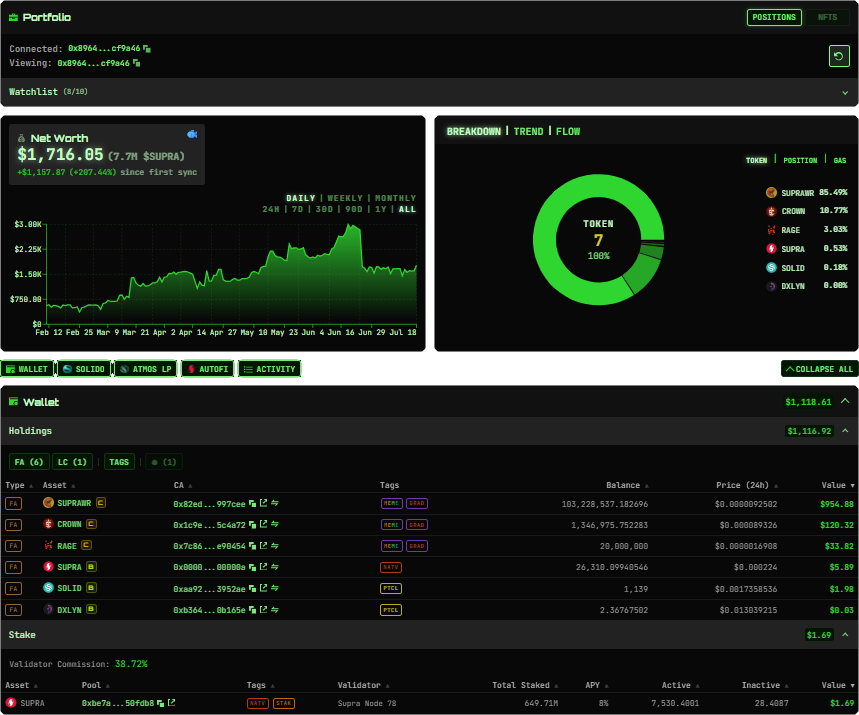
See SUPRA, token balances, available prices, and native staking positions together. Understand what you hold and how much each asset contributes to your portfolio.
Your whole Supra portfolio. One clear view.
Bring wallet balances, staking, liquidity pools, and supported DeFi positions together. Follow your net worth, explore your allocation, and keep the wallets that matter within reach.
Beyond a wallet balance
From liquid tokens to positions across Supra DeFi, Portfolio turns scattered balances into a view you can use.
See SUPRA, token balances, available prices, and native staking positions together. Understand what you hold and how much each asset contributes to your portfolio.
Follow portfolio value in USD and SUPRA. Explore saved net worth history and the Breakdown, Trend, and Flow views to understand allocation and changes over time.
Track supported LPs, farms, staking, bonds, and locks. Review available rewards, rates, and unlock dates alongside the value of your positions.
Organize addresses in My Wallets and include selected wallets in a combined portfolio. Keep a clear view of your total while retaining each wallet's identity.
Save wallets you follow and return to their portfolio metrics from one workspace. Keep personal, treasury, project, and other public addresses within reach.
Mask displayed values with Privacy mode. Review your portfolio on a shared screen without showing balances, chart values, or position totals.
Explore supported positions across Atmos, WARs, Solido, Hoglet, and HypeMarket, plus native staking and AutoFi. Read the Portfolio guide for panel coverage and history details.
Built around your wallet
Connect your Supra wallet using StarKey. Your assets stay in your wallet; connecting does not transfer tokens.
Use Sync to refresh supported balances and positions. Saved portfolio data remains available between updates, with stale data identified when a source cannot refresh.
Review your net worth, expand protocol panels, and inspect your holdings. Add saved wallets and compare your history as snapshots build over time.
A Supra portfolio tracker brings wallet balances and supported on-chain positions into one view. Synthwav combines token holdings, staking, liquidity positions, and saved history so you can understand your portfolio without moving between protocol websites.
Synthwav includes panels for supported Atmos and WARs LPs and farms, Solido staking, bonds and locks, Hoglet positions, HypeMarket markets, and AutoFi tasks. Available panels and details depend on your access and the supported protocol data.
Yes. My Wallets lets you organize additional addresses and include selected wallets in a combined portfolio. Watchlist keeps wallets you follow separately, so your own wallet group and watched addresses stay distinct.
Yes. Net worth charts use saved portfolio snapshots. History builds from available observations; connecting a wallet does not recreate a complete historical balance record. Missing observations are not treated as zero.
Portfolio balances reflect successful syncs, and values depend on available pricing. Check update times and stale indicators. If a supported source fails, Synthwav preserves the last known data rather than treating a failed fetch as an empty position.
Core wallet tracking is available with Basic access. Prime adds features including supported DeFi panels, full net worth history, and extended watchlist access. See My Prime for current access details.
Keep exploring: Portfolio documentation, My Prime, and Token Insight Profiles.